The Schedule and Subscription Manager in the Content Management System is a personalized interface for users to manage their own schedules and subscriptions from across the platform in a single toolset.
Schedule Manager
The manager gives users a bird's-eye view of:
- All tasks they have scheduled in Publish and Model.
- All items they are subscribed to in Discover, Present, Publish, and Tabulate.
- All data alerts they have set up in Discover and Present.
Accessing the Manager
Click the Ellipsis icon (three vertical dots, green arrow below) in the content toolbox to reveal hidden items, then select Schedule Manager from the list.
The Schedule Manager includes a tab for each of the scheduled item types (red box):
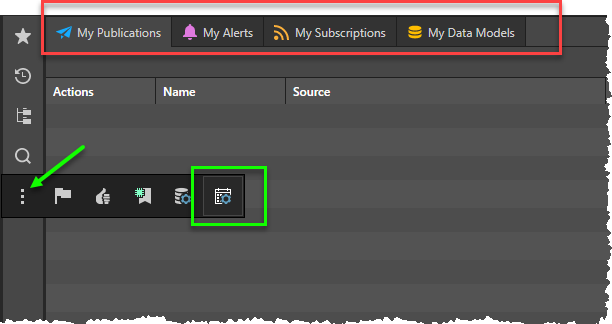
In each tab, the user will see similar content:
- Actions: there are 4 actions per item Stop, Start, Edit and Delete
- Name: the name of the schedule or subscription
- Type: the source of the scheduled item (Discover, Present, Model, Publish)
- Source: the name of the source file that the schedule or subscription is based on. Click the item to jump to its location in the content explorer
- Description: any description attached to the schedule
- Start Date: the first time the schedule or subscription was run
- End Date: the final time the schedule or subscription was run

Editing Subscriptions
Click the pencil icon beside any subscription to edit its details.
 When editing a subscription, a toggle button allows you to switch between Basic and Advanced Schedule settings: In the Advanced view, you can define recurring or on demand schedules in detail. In the Basic view you can select from one of the "preset" schedule options (Weekdays at 7AM, for example).